本站所有手册或者说明书或者指南提到的设备均是站长自行购买并日常使用的;中文译文或者英文译文为站长自用而作,其中也包含站长自己的补充与原创内容。 仅限本站阅读,禁止转载,禁止传播。
All equipment mentioned in any manual, instruction book, or guide on this site was purchased by the site owner himself and is used by him in daily life. The Chinese or English translations were made for his own use and also include his own additions and original content. For reading on this site only; republication and redistribution are prohibited.
其他功能Other Functions
本章汇集 IC-7300 的一些辅助功能:主调谐旋钮(MAIN DIAL)下方的阻尼调节器可按手感滑动调整;SPEECH 功能用英文或日文语音播报当前频率、模式与 S 表读数;SWR 测量提供点测(Spot measurement)与图测(Plot measurement)两种方式,后者可在 SWR GRAPH 屏幕上一次扫描整个设定频率范围。此外还介绍了显示背景与频率字体的选择、检测功放温度的两级保护功能、借助 WWV/WWVH 标准频率信号进行的 REF 调整、在开机画面显示本人呼号、把当前屏幕画面抓存到 SD 卡的屏幕捕获功能、可一键切换数据模式设置组合的 PRESET 菜单,以及与 IC-PW2 组成 SO2R 双机系统时的发射机锁定功能。
This chapter describes some of the auxiliary functions of the IC-7300. The friction adjustor located under MAIN DIAL can be slid to suit your preference. The SPEECH function announces the current frequency, mode and S-meter level in English or Japanese. SWR measurement offers two methods: Spot measurement and Plot measurement, the latter scanning the entire specified frequency range on the SWR GRAPH screen. Also described are the display background and frequency readout font selection, the two-step protection function that detects the power amplifier temperature, the REF adjustment using the WWV or WWVH standard frequency signal, displaying your own call sign at power ON, the Screen Capture function that stores the transceiver display onto an SD card, the PRESET menu that switches between saved combinations of data mode settings, and the Transmitter Lockout function used with the IC-PW2 for SO2R operation.
13-2调整主调谐旋钮的阻尼Adjusting the main dial friction
您可以调整 MAIN DIAL 的阻尼,使之符合自己的手感偏好。
You can adjust the friction of MAIN DIAL to suit your preference.
阻尼调节器位于 MAIN DIAL 的下方。参见下图。
The friction adjustor is located under MAIN DIAL. See the illustration below.
在沿同一方向连续、均匀转动旋钮的同时滑动调节器,找到阻尼手感舒适的位置。
Slide the adjustor for a comfortable friction level while continuously and evenly turning the dial in one direction.
13-2使用 SPEECH 功能Using the SPEECH function
本收发信机内置语音合成器,可用清晰的电子合成语音以英文或日文播报工作频率、工作模式以及 S 表读数。
The transceiver has a built-in Voice synthesizer to announce the operating frequency, mode, as well as the S-meter level in a clear electronically-generated voice, in either English or Japanese.
首先,在 SPEECH 屏幕上设定以下项目。
MENU » SET > Function > SPEECH
First, set the following items in the SPEECH screen.
MENU » SET > Function > SPEECH
• SPEECH Language
• SPEECH Speed
• S-Level SPEECH
• MODE SPEECH
• SPEECH Level
• SPEECH Language
• SPEECH Speed
• S-Level SPEECH
• MODE SPEECH
• SPEECH Level
提示 NOTENOTE
按SPEECH键播报当前选用的频率、模式*和S 表*读数。
Push SPEECH to announce the currently selected frequency, mode* and S-meter* level.
说明 NOTENOTE
* 若设置为 ON,则同时播报工作模式与 S 表读数。
* If set to ON, the Mode and S-meter level are announced.
13-2测量 SWRMeasuring SWR
本收发信机装有高性能 SWR 表。即使发射输出功率频繁变化(例如在 SSB 模式下发射时),该表也能实时显示稳定的测量结果。
The transceiver has a high-performance SWR meter. This meter displays a stable measurement in real time, even if the transmit output power varies frequently, such as during an SSB mode operation.
您可以利用内置天线调谐器直接测量天线本身的驻波比。
You can measure the SWR of an antenna itself through the internal antenna tuner.
测量 SWR 有 2 种方式,一种是点测(spot measurement),另一种是图测(plot measurement)。
There are 2 ways to measure SWR, one is spot measurement and the other is plot measurement.
点测(Spot measurement)Spot measurement
1按TUNER键将天线调谐器设为 OFF。
1Push TUNER to turn OFF the antenna tuner.
2选择 RTTY 或 RTTY-R 模式。
2Select the RTTY or RTTY-R mode.
3设定所需频段,并将频率设在该波段中您使用最多的那一段范围内。
3Set the desired frequency band and a frequency in the portion of the band that you use the most.
4必要时,在多功能菜单中将射频功率调整到 30 W 以上。
• 70 MHz:20 W
(70 MHz 波段能否发射取决于收发信机的版本。)
4If necessary, adjust the RF power to more than 30 W in the Multi-function menu.
• 70 MHz: 20 W
(70 MHz 波段是否可发射取决于收发信机的版本。)
提示 NOTENOTE
如果已连接天线调谐器而您想直接测量天线本身的驻波比,请执行步骤 1。
Perform step 1 if the antenna tuner is connected and you want to measure the SWR of the antenna itself.
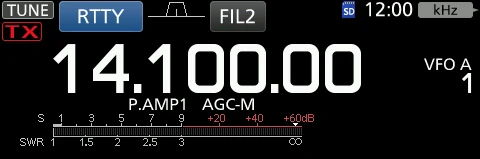
5多次触摸 TX 仪表,直到选中 SWR 表。(见 13-2 节)
5Touch the TX meter several times until the SWR meter is selected. (p. 13-3)
6按TRANSMIT键,或按住话筒上的 [PTT] 键发射。
6Push TRANSMIT or hold down [PTT] on the microphone to transmit.
7读取仪表上的 SWR 读数。
7Read the SWR on the meter.
8松开TRANSMIT键或松开 [PTT] 键,停止发射。
8Push TRANSMIT or release [PTT] to stop transmitting.
提示 NOTENOTE
发射前请监听工作频率,确认不会干扰同频的其他台站。
Before transmitting, monitor the operating frequency to make sure you will not cause interference to other stations on the same frequency.
提示 NOTENOTE
如果 SWR 表指示 1.5 或以下,说明天线已匹配。
If the SWR meter indicates 1.5 or less, the antenna is matched.
提示 NOTENOTE
如果测得的 SWR 高于 1.5:1,请按 [TUNER] 键将天线与收发信机匹配。
If the measured SWR is more than 1.5:1, push [TUNER] to match the antenna with the transceiver.
提示 TIPTIP
最佳匹配范围:SWR 表上标注「The best match is within this range. (1.5 or less)」,即 1.5 或以下。
The best match is within this range (1.5 or less), as marked on the SWR meter scale.
火腿经验 HAM TIPHAM TIP
SWR 高的时候不要硬发射。内置调谐器虽有保护,但驻波比长期过高会伤功放;先查天馈系统(馈线接头、驻波比、收发天线间距),再用上面的点测法验证。
Do not transmit hard into a high SWR. Although the tuner has protection, a persistently high SWR will damage the final amplifier. Check the antenna system (connectors, SWR and antenna spacing) first, then verify with the spot measurement above.
图测(Plot measurement)Plot measurement
您可以在整个设定的频率范围内测量 SWR。
You can measure the SWR over the entire set frequency range.
1设定所需频段。
1Set the desired frequency band.
2必要时,在多功能菜单中将射频功率调整到约 30 W。
• 70 MHz:20 W
(70 MHz 波段能否发射取决于收发信机的版本。)
2If necessary, adjust the RF power to approximately 30 W in the Multi-function menu.
• 70 MHz: 20 W
(70 MHz band transmission may be possible, depending on the transceiver version.)
3打开 SWR GRAPH 屏幕。
MENU » SWR
3Open the SWR GRAPH screen.
MENU » SWR
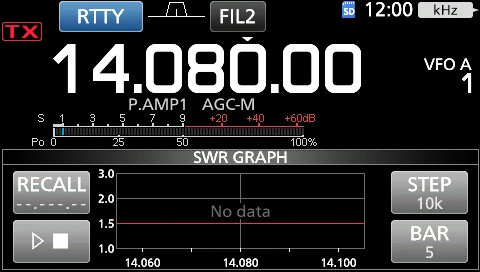
4设定待测 SWR 的中心频率。(示例:14.080.00)
4Set the center frequency for the SWR to be measured. (Example: 14.080.00)
提示 NOTENOTE
发射前请监听工作频率,确认不会干扰同频的其他台站。
Before transmitting, monitor the operating frequency to make sure you will not cause interference to other stations on the same frequency.
5必要时,多次触摸 [STEP] 直到选中测量步进,或多次触摸 [BAR] 直到选中图表条数。
• 测量步进可在 10、50、100 和 500 kHz 之间选择。
• 图表条数可在 3、5、7、9、11 和 13 条之间选择。
5If necessary, touch [STEP] several times until the measuring step is selected, or touch [BAR] several times until the number of graph bars is selected.
• You can select between 10, 50, 100 and 500 kHz measuring steps.
• You can select between 3, 5, 7, 9, 11 and 13 graph bars.
6触摸 [▶/■] 开始测量。
• 此时显示频率标记「▲」和测量频率。
6Touch [▶/■] to start measuring.
• The frequency marker "▲" and the measurement frequency are displayed.
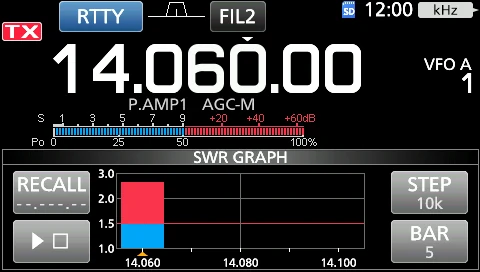
7按TRANSMIT键,或按住话筒上的 [PTT] 键发射。
• 条形图显示 SWR。
7Push TRANSMIT or hold down [PTT] on the microphone to transmit.
• The bar graph displays the SWR.
8松开TRANSMIT键或松开 [PTT] 键,停止发射。
8Push TRANSMIT or release [PTT] to stop transmitting.
9重复步骤 7 和 8,在整个频率范围内测量 SWR。
9Repeat steps 7 and 8 to measure the SWR over the entire frequency range.
说明 NOTENOTE
SWR GRAPH 屏幕上的各元素:Measuring step(测量步进)=[STEP] 的设定值;Measuring frequency(测量频率)=频率标记「▲」所处的频率;Number of graph bars(图表条数)=[BAR] 的设定值;Center frequency(中心频率)=测量结束后显示的频率。图表上标有「The best match is within this range. (1.5 or less)」,即最佳匹配范围为 1.5 或以下。
Elements on the SWR GRAPH screen: "Measuring step" is the value set with [STEP]; "Measuring frequency" is the frequency at which the frequency marker "▲" is positioned; "Number of graph bars" is the value set with [BAR]; "Center frequency" is displayed after the measurement. The graph is marked "The best match is within this range. (1.5 or less)".
提示 TIPTIP
• 旋转 MAIN DIAL 可将频率标记「▲」移动到当前发射频率。
• 当发射频率超出显示范围时,会显示「<<」(低)或「>>」(高)。
• 长按 [RECALL] 1 秒可将频率标记「▲」移回中心频率。
• 触摸条形图即可删除已测得的 SWR。
• Rotate MAIN DIAL to move the frequency marker "▲" to the current transmit frequency.
• "<<" (low) or ">>" (high) is displayed when the transmitted frequency is out of the displayed range.
• Touch [RECALL] for 1 second to move the frequency marker "▲" back to the center frequency.
• Touch the bar graph to delete the measured SWR.
13-3选择显示类型与字体Selecting the display type and font
您可以在 2 种显示背景和 2 种频率显示字体之间选择。
You can select between 2 display backgrounds and 2 frequency readout fonts.
选择显示背景Selecting the display background
1选择「Display Type」屏幕。
MENU » SET > Display > Display Type
1Select the "Display Type" screen.
MENU » SET > Display > Display Type
2旋转 MULTI 选择背景 A 或 B,然后按 MULTI 确定。
• A:黑色背景默认:A
• B:蓝色背景
2Set the background A or B by rotating and then pushing MULTI.
• A: Black background (default)
• B: Blue background
3要关闭 DISPLAY 屏幕,请多次按 EXIT。
3To close the DISPLAY screen, push EXIT several times.
选择显示字体Selecting the display font
1选择「Display Font」屏幕。
MENU » SET > Display > Display Font
1Select the "Display Font" screen.
MENU » SET > Display > Display Font
2旋转 MULTI 将显示字体设为「Basic」或「Round」,然后按 MULTI 确定。
• Basic(默认)默认:Basic
• Round
2Set the desired display font to "Basic" or "Round" by rotating, and then pushing MULTI.
• Basic (Default)
• Round
3要关闭 DISPLAY 屏幕,请多次按 EXIT。
3To close the DISPLAY screen, push EXIT several times.
13-4保护功能Protection function
当天线驻波比变高时,本收发信机的两级保护功能可保护末级功放。
The transceiver has a 2 step protection function to protect the final power amplifiers in case the antenna SWR becomes high.
该功能通过检测功放温度来工作,当温度过高时即启动保护。
The function detects the power amplifier temperature and activates when the temperature becomes too high.
| 保护动作Protection step | 作用Action | 屏幕显示Screen indication |
|---|---|---|
| Power down transmission | 降低发射输出功率。Reduces the transmission output power. | 发射时在 PO 图标下方显示 "LMT"。"LMT" is displayed below the PO icon while transmitting. |
| TX inhibit | 禁止发射机发射。Disables the transmitter. | 发射机被禁止时,在 PO 图标位置显示 "TX"。"TX" is displayed instead of the PO icon while the transmitter is disabled. |
说明 NOTENOTE
屏幕上以「TX inhibit zone」标示禁止发射的区域。
The "TX inhibit zone" is indicated on the screen.
该功能启动后,请仅用接收方式操作收发信机,等待功放冷却。
When the function is activated, wait until the power amplifier cools down by using the transceiver to only receive.
警告 NOTENOTE
保护功能启动时,请勿关闭收发信机电源。如果关闭,冷却风扇将停止工作,冷却所需时间会更长。
Do not turn OFF the transceiver power when the Protection function is activated. If you do, the cooling fan will deactivate and it will take longer to cool down.
• 可通过多功能仪表中的 TEMP 表检查功放温度。
• You can check the power amplifier temperature with the TEMP gauge in the Multi-function meter.
13-4REF 调整REF adjustment
您可以通过接收 WWV、WWVH 无线电台或其他标准频率信号,进行粗略的频率校准。
You can perform a rough frequency calibration by receiving the radio station WWV, WWVH, or other frequency signals.
提示 NOTENOTE
• 本收发信机出厂前已在工厂完成调整与测试,通常无需重新校准。
• 进行频率校准之前,必须将「Calibration Marker」设为 ON。
• Calibration Marker 为 ON 期间,屏幕上可能出现杂散信号波形。
• The transceiver has been adjusted and tested at the factory before being shipped out. You should not have to re-calibrate.
• Before performing a frequency calibration, you have to set "Calibration Marker" to ON.
• Spurious signal waveforms may be displayed while the Calibration Marker is ON.
提示 NOTENOTE
进行频率校准之前,请按下表设定以下项目。
Before performing a frequency calibration, set the following items as described in the table below.
| 项目Item | 设定内容Setting |
|---|---|
| AF | 音量适中、可听清Decent audibility |
| RF/SQL | 射频增益最大Maximum RF gain |
| TWIN PBT | CLR:长按 1 秒进行复位CLR: Reset by holding down for 1 second |
| Operating mode | USBUSB |
| RIT | OFF(不显示 RIT 图标)OFF (No RIT icon displayed) |
1将频率设为标准频率台减去 1 kHz。
• 如果以 WWV 或 WWVH(15.00000 MHz)作为标准频率信号接收,请将工作频率设为 14.99900 MHz。
1Set the frequency to the standard frequency station minus 1 kHz.
• If receiving WWV or WWVH (at 15.00000 MHz) as your standard frequency, set the operating frequency to 14.99900 MHz.
2将「Calibration Marker」设为 ON。
MENU » SET > Function > Calibration Marker
2Set "Calibration Marker" to ON.
MENU » SET > Function > Calibration Marker
3选择「REF Adjust」项目。
MENU » SET > Function > REF Adjust
3Select the "REF Adjust" item.
MENU » SET > Function > REF Adjust
4旋转 MULTI,调整使接收到的标准信号达到零拍。
• 「零拍(zero beat)」是指两个信号设定为完全相同的频率,从而发出单一音调。
4Rotate MULTI to adjust for a zero beat with the received standard signal.
• "Zero beat" means that the exact same frequencies are set to 2 signals, resulting in a single tone being transmitted.
5将「Calibration Marker」设为 OFF。
5Set "Calibration Marker" to OFF.
6多次按EXIT键,直到关闭 SET 屏幕。
6Push EXIT several times until the SET screen is closed.
13-5显示我的呼号Displaying my call sign
您可以让本机在开机时显示自己的呼号。
You can display your own call sign at power ON.
[示例:显示呼号 JA3YUA]
[Example: Displaying the call sign JA3YUA]
1打开 MY CALL 屏幕。
MENU » SET > Display > My Call
1Open the MY CALL screen.
MENU » SET > Display > My Call
2输入最多 10 个字符的呼号。
• 详情请参阅「键盘输入与编辑」(见 1-9 节)。
2Enter your call sign of up to 10 characters.
• See "Keyboard entering and editing" (p. 1-9) for details.
3触摸 [ENT] 保存输入的呼号。
• MY CALL 屏幕关闭并返回 DISPLAY 屏幕。
• 显示输入的名称。
• 开机时显示输入的呼号。
3Touch [ENT] to save the entered call sign.
• The MY CALL screen closes and returns to the DISPLAY screen.
• The entered name is displayed.
• The entered call sign is displayed at power ON.
13-5屏幕捕获功能Screen Capture function
您可以把收发信机的显示画面捕获并存入 SD 卡。本手册中使用的大多数屏幕画面都是用此功能捕获的,但部分显示画面无法捕获。
You can capture the transceiver display onto an SD card. Most of the screens used in this manual are captured using this function. However, some displays cannot be captured.
捕获屏幕画面Capturing a screen
1打开「Screen Capture [POWER] SW」屏幕。
MENU » SET > Function > Screen Capture [POWER] SW
1Open the "Screen Capture [POWER] SW" screen.
MENU » SET > Function > Screen Capture [POWER] SW
2旋转 MULTI 选择「ON」并按 MULTI 确定。
2Select "ON" by rotating and pushing MULTI.
3选择要捕获的屏幕画面。
3Select the desired screen to capture.
4按POWER键捕获该屏幕画面。
• 捕获的屏幕画面将保存到 SD 卡。
4Push POWER to capture the screen.
• The captured screen is saved onto the SD card.
查看已捕获的屏幕画面Viewing the captured screen
1打开 SCREEN CAPTURE VIEW 屏幕。
MENU » SET > SD Card > Screen Capture View
• 此时显示捕获列表。
• 最新捕获的画面位于列表顶部。
1Open the SCREEN CAPTURE VIEW screen.
MENU » SET > SD Card > Screen Capture View
• The capture list is displayed.
• The latest screen capture is at the top of the list.
2旋转 MULTI 选择要显示的屏幕捕获画面,然后按 MULTI 确定。
• 显示所选的屏幕捕获画面。
2Select the desired screen capture to be displayed by rotating and pushing MULTI.
• The selected screen capture is displayed.
提示 NOTENOTE
显示屏幕捕获画面时,旋转 MULTI 可浏览全部屏幕捕获画面。
While a screen capture is displayed, you can scroll through all the screen captures by rotating MULTI.
捕获列表中的其他选项Other options in the capture list
1显示捕获列表时,按QUICK键调出 QUICK MENU。
1While the capture list is displayed, push QUICK to display the QUICK MENU.
2选择所需选项。
• File Information:显示所选屏幕捕获画面的名称、大小和日期。
• Delete:删除文件前会显示确认对话框。选择 [YES] 删除,或选择 [NO] 取消。
• Delete All:删除列表中全部文件前会显示确认对话框。选择 [YES] 删除,或选择 [NO] 取消。
2Select the desired option.
• File Information: Displays the name, size and date of the selected screen capture.
• Delete: The confirmation dialog is displayed before deleting the file. Select [YES] to delete or select [NO] to cancel.
• Delete All: The confirmation dialog is displayed before deleting all the files on the list. Select [YES] to delete or select [NO] to cancel.
火腿经验 HAM TIPHAM TIP
SD 卡必须在电台内格式化:在 Windows 里格式化的卡 IC-7300 常不识别,用 MENU » SET > SD Card > Format 最稳;容量支持到 32GB(SDHC)。截图存证、设置备份一起做,是最可靠的「设置三件套」。
The SD card must be formatted inside the transceiver: cards formatted in Windows are often not recognized by the IC-7300, and MENU » SET > SD Card > Format is the most reliable way. Up to 32GB (SDHC) is supported. Keeping screen captures, a setting backup and your notes together makes the "three-part backup" most reliable.
火腿经验 HAM TIPHAM TIP
QUICK MENU(从屏幕顶部下滑或按相应区域)能快速改 Meter Type、启动录制,比逐层翻 SET 菜单快得多。
The QUICK MENU (slide down from the top of the screen or press the corresponding area) lets you change the Meter Type or start recording quickly — much faster than paging through the SET menus.
13-6PRESET 菜单PRESET menu
您可以把下列设置的组合保存为预设存储,以便按操作需要快速切换数据模式的设置。
You can save the combination of the following settings for the data mode to quickly change the settings, depending on your operating needs.
| 设置项目Setting item | 设置项目Setting item |
|---|---|
| Preset Name | SSB TBW |
| Mode | SSB TX Bandwidth |
| Filter | USB SEND |
| Filter BW | USB Keying (CW) |
| Filter Type (HF) | USB Keying (RTTY) |
| Filter Type (50M - ) | Inhibit Timer at USB Connection |
| ACC/USB Output Select | ACC/USB AF Output Level |
| CI-V Baud Rate | ACC/USB AF SQL |
| CI-V Address | ACC/USB IF Output Level |
| CI-V Transceive | USB MOD Level |
| USB Serial Function | DATA MOD |
| CI-V USB Port | SSB-D TX Bandwidth |
| CI-V USB Baud Rate | DATA OFF MOD |
| CI-V USB Echo Back | COMP |
提示 NOTENOTE
本收发信机共有 5 个预设存储。
The transceiver has a total of 5 memories.
加载预设存储Loading the preset memory
1按MENU键。
1Push MENU.
2触摸屏幕底部中央的 2。
2Touch 2 at the center bottom of the screen.
3触摸 [PRESET]。
3Touch [PRESET].
4触摸要加载的预设存储。
4Touch the preset memory to load.
5触摸 [YES]。
• 所选的预设存储被加载,PRESET 屏幕上显示「In Use」。如果随后更改了收发信机的设置,使其与预设存储的内容不一致,「In Use」即消失。
5Touch [YES].
• The selected preset memory is loaded, and "In Use" is displayed on the PRESET screen. If you change the transceiver settings, and they do not match the contents of the preset memory, "In Use" disappears.
提示 NOTENOTE
触摸 [UNLOAD] 可将收发信机的设置恢复为加载预设存储之前的设置。
Touching [UNLOAD] returns the transceiver settings to those set before loading the preset memory.
警告 NOTENOTE
• 在 Memory 模式下选择了空白存储通道时,无法加载预设存储的内容。
• 无法加载显示为「(BLANK)」的预设存储。
• You cannot load the preset memory content when you select a blank memory channel in the Memory mode.
• You cannot load a preset memory that is displayed as "(BLANK)."
编辑存储内容Editing the memory contents
警告 NOTENOTE
无法编辑正在使用中的预设存储。要编辑它,请先触摸 [UNLOAD],然后再编辑该存储。
You cannot edit the preset memory that is in use. To edit it, first touch [UNLOAD], and then edit the memory.
1在 PRESET 屏幕上,长按要编辑的预设存储 1 秒。
• 打开 QUICK MENU 屏幕。
1On the PRESET screen, touch a preset memory to edit for 1 second.
• Opens the QUICK MENU screen.
2触摸「Edit the Preset Memory」。
• 触摸「Save to the Preset Memory」时,全部内容都会被设为编辑前的当前设置。
2Touch "Edit the Preset Memory."
• When touching "Save to the Preset Memory," all of the contents are set to the current settings before editing.
3触摸复选框,选择是否加载该项目。
3Touch the check box to select whether or not to load the item.
4在该加载项目的左侧显示「✓」。
4"✓" is displayed on the left side of the loading item.
5触摸项目名称,然后触摸要设置的选项。
• 预设名称最多可设置 16 个字符。
5Touch the item name, and then touch the option to set.
• You can set the preset name of up to 16 characters.
6重复步骤 3 和 4,继续编辑预设存储。
6Repeat steps 3 and 4 to edit the preset memory.
7触摸「<<Write>>」。
7Touch "<<Write>>."
8触摸 [YES]。
8Touch [YES].
说明 NOTENOTE
译注:源文本步骤 6 写作「Repeat steps 3 and 4」,按上下文(设置各项的取值)应理解为重复步骤 3 ~ 5。本片段保留原文编号并加此说明。
Translator's note: step 6 of the source text reads "Repeat steps 3 and 4," which by context (setting the value of each item) should mean repeating steps 3 to 5. The original numbering is kept in this fragment, with this note added.
提示 TIPTIP
根据您使用的软件,可能需要更改「CI-V Address」设置。例如您使用的软件与 IC-7300 不兼容,此时可尝试把「CI-V Address」设置为另一台收发信机的地址。
Depending on your software, you may need to change the "CI-V Address" setting. For example, you use a software that is not compatible with the IC-7300. In that case, you may be able to use the software by setting "CI-V Address" to another transceiver's address.
13-6发射机锁定功能Transmitter Lockout function
当两台支持发射机锁定功能的 Icom 激励器(包括 IC-7300)连接到 IC-PW2,组成单机双电台(SO2R)系统时,该功能可防止两台激励器同时发射。
When 2 Icom exciters that support the Transmitter Lockout function, including the IC-7300, are connected to the IC-PW2 to Single Operator Two Radios (SO2R) operation, the function prevents the simultaneous transmission from the exciters.
提示 NOTENOTE
当TX inhibit 指令(16 66)发送到连接到 IC-PW2 射频输入端(该端被设为接收侧,INPUT 指示灯呈绿色)或 OFF(INPUT 指示灯熄灭)的那台激励器时,该激励器的屏幕上显示 INH 图标。
When the TX inhibit command (16 66) is sent to the exciter connected to the IC-PW2's RF input connector set to the RX side (INPUT indicator lights green) or OFF (INPUT indicator is OFF), the INH icon is displayed on the exciter's screen.
当该激励器试图发射时,屏幕上显示「TX Inhibit」,并且无法发射。
When the exciter tries to transmit, "TX Inhibit" is displayed and cannot transmit.