Contents
- English | Why I Register on 30-Year-Old Websites: Leaving Fo
- Why — my story
- My retro pages
- How to register — step by step
- A gift, and a closing thought
- Deutsch | Warum ich mich auf 30 Jahre alten Webseiten regist
- Warum — meine Geschichte
- Meine Retro-Seiten
- Registrieren — Schritt für Schritt
- Ein Geschenk — und ein Schlusswort
- 日本語 | なぜ30年モノのウェブサイトに登録するのか:ビンテージウェブに足跡を残す
- なぜ登録するのか——私の思い
- 私のレトロページ
- 登録方法——ステップ・バイ・ステップ
- プレゼントと、最後に一言
- 中文 | 为什么要在30岁的老网站上注册:在复古互联网上留下足迹
- 为什么——我的心得
- 我的复古页面
- 注册教程——一步一步来
- 一份礼物,最后说一句
English | Why I Register on 30-Year-Old Websites: Leaving Footprints on the Vintage Web
Why — my story
When I was young, I spent countless nights hunting for free web space — any corner of the internet where I could build my own little site. A guestbook here, a hit counter there, a page hand-coded in Notepad. That was happiness.
Tonight I registered on several websites that are older than some of my radios. QRZ.com has been around since 1992. qsl.net since 1996. These sites watched the web grow up.
I know these old sites may one day lose their maintainers. Registration may close for good someday. But I know one thing: once your data is registered there, it never truly disappears. Time is the best proof — 时间是最好的证明.
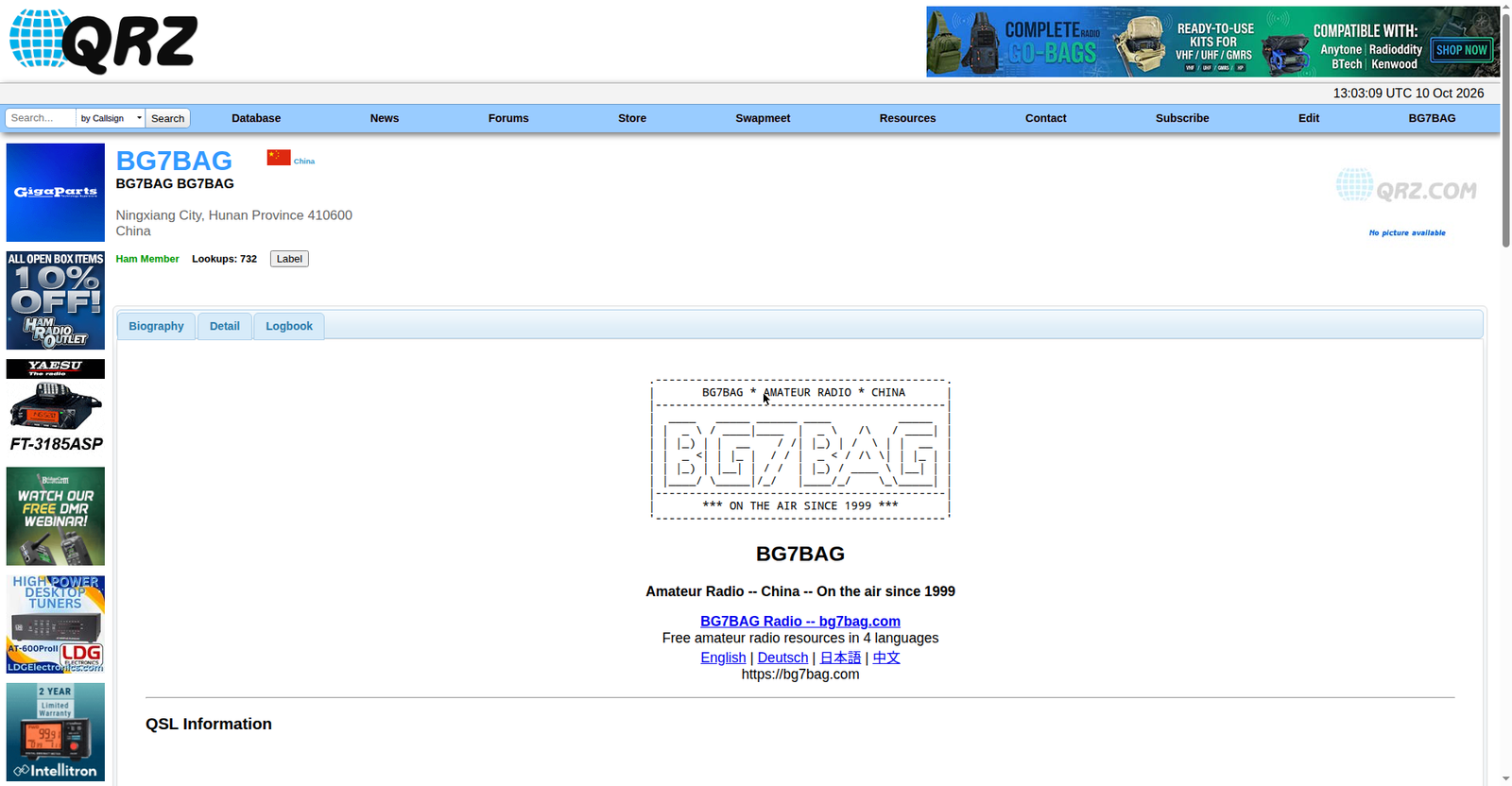
That is why the pages I built tonight are deliberately ultra-retro: old <font> tags, navy-blue headings, and an ASCII-art callsign banner drawn with dots and lines. It is not laziness. It is a tribute to that era — the era that made me a ham, and a web builder.
My retro pages
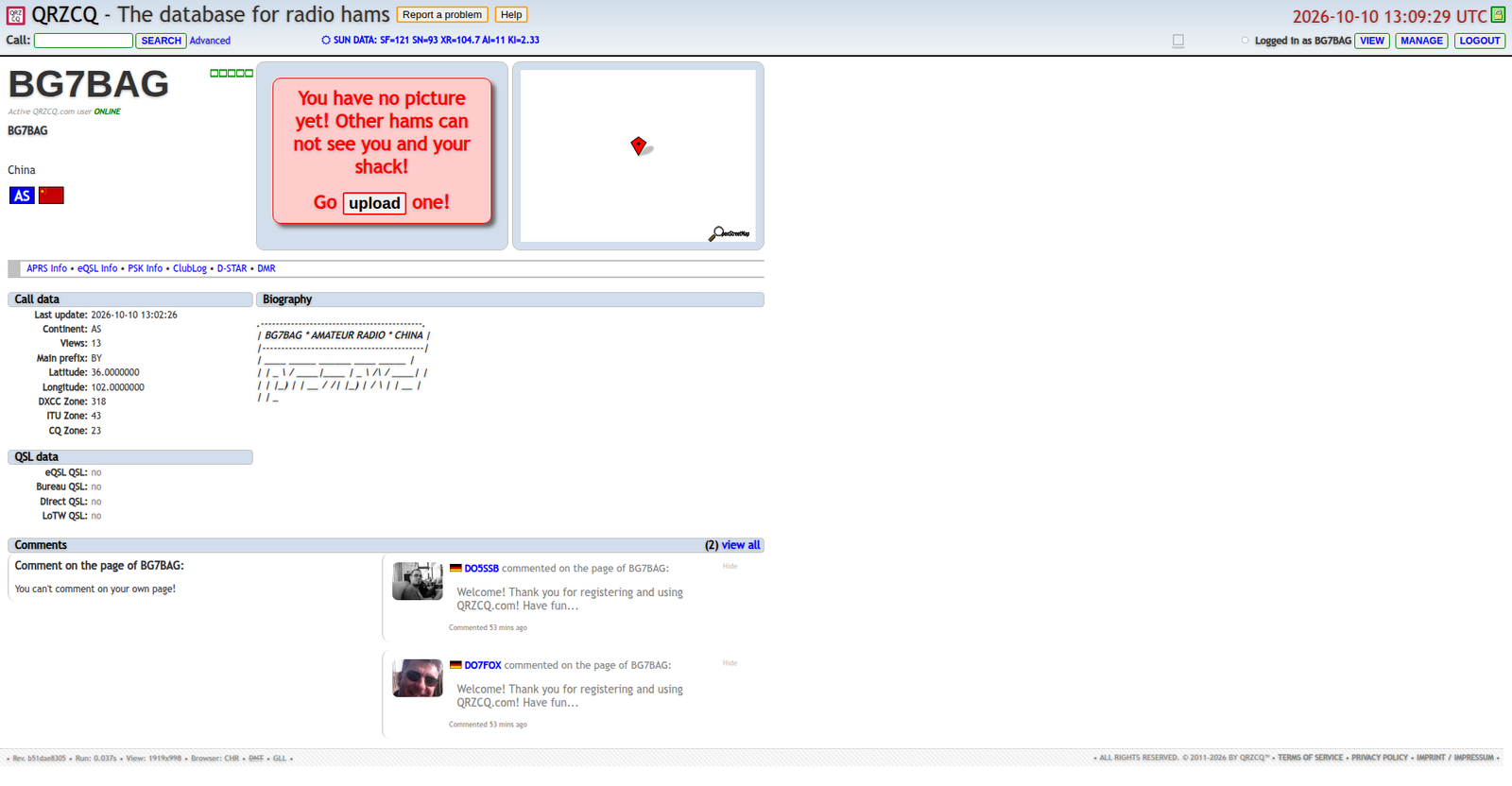
Tonight I rebuilt two of my biography pages in late-1990s style:
QRZ.com (est. 1992) — my callsign biography, now plain classic HTML with the ASCII banner on top:
QRZCQ — my biography there, same vintage treatment:
https://www.qrzcq.com/call/BG7BAG
How to register — step by step
QRZ.com (est. 1992)
- Register with your callsign and an email address.
- Click the verification link in the email.
- Open your callsign page (qrz.com/db/YOURCALL) and edit your biography.
QRZCQ.com
- Open the registration page: pick a username, enter your callsign and your registration email.
- Click the verification link in the email — your account is activated.
- Log in, go to MANAGE → the profile data page, and edit your Biography.
HamQTH.com
- Open https://www.hamqth.com/register
- Fill in: callsign, name, QTH, country, email; answer the anti-spam question with “73”; tick the data-processing consent box; type your password twice.
- Submit, then click the verification link in the email.
qsl.net (est. 1996)
- Open the qsl.net signup page and choose the FREE “Website plus E-Mail Forwarding” option (skip the donation-based options).
- Fill in name, callsign, QTH and email; answer the check question (“73”); submit.
- There is no email verification link — volunteers review applications by hand and will email you your FTP/account info.
- Once approved, you have 60 days to put up your page.
A few practical tips
- Use a dedicated email address for these registrations, and never publish it.
- Your public identity is your callsign — do not put your real name on public pages.
- Match each site’s vintage aesthetic: plain old HTML, no modern gradients, cards or shadows. When on an old site, build like it is 1998.
A gift, and a closing thought
Here is my ASCII callsign banner. Copy it, replace BG7BAG with your own callsign — or keep mine as a tribute:
.-------------------------------------------.
|       BG7BAG * AMATEUR RADIO * CHINA      |
|-------------------------------------------|
|  ____   _____ ______ ____          _____  |
| |  _ \ / ____|____  |  _ \   /\   / ____| |
| | |_) | |  __    / /| |_) | /  \ | |  __  |
| |  _ <| | |_ |  / / |  _ < / /\ \| | |_ | |
| | |_) | |__| | / /  | |_) / ____ \ |__| | |
| |____/ \_____|/_/   |____/_/    \_\_____| |
|-------------------------------------------|
|       *** ON THE AIR SINCE 1999 ***       |
'-------------------------------------------'
Use your imagination. Build your own retro page. Leave your footprint on the old web — before registration closes there someday.
73 de BG7BAG
Deutsch | Warum ich mich auf 30 Jahre alten Webseiten registriere: Fußspuren im Vintage-Web hinterlassen
Warum — meine Geschichte
Als ich jung war, habe ich unzählige Nächte damit verbracht, kostenlosen Webspace zu suchen — irgendeine Ecke des Internets, in der ich meine eigene kleine Seite bauen konnte. Ein Gästebuch hier, ein Besucherzähler dort, eine Seite handgeschrieben in Notepad. Das war Glück.
Heute Nacht habe ich mich auf mehreren Webseiten registriert, die älter sind als manche meiner Funkgeräte. QRZ.com gibt es seit 1992. qsl.net seit 1996. Diese Seiten haben das Web groß werden sehen.
Ich weiß: Diese alten Seiten werden eines Tages vielleicht nicht mehr gepflegt. Die Registrierung wird vielleicht irgendwann für immer geschlossen. Aber eines weiß ich genau: Was dort einmal registriert ist, verschwindet nie wirklich. Die Zeit ist der beste Beweis — 时间是最好的证明.
Darum sind meine neuen Seiten absichtlich ultra-retro: alte <font>-Tags, dunkelblaue Überschriften und ein ASCII-Banner aus Punkten und Strichen mit meinem Rufzeichen. Das ist keine Faulheit. Es ist eine Hommage an diese Ära — die Ära, die mich zum Funkamateur und zum Web-Bastler gemacht hat.
Meine Retro-Seiten
Heute Nacht habe ich zwei meiner Biografie-Seiten im Stil der späten 90er neu aufgebaut:
QRZ.com (seit 1992) — meine Rufzeichen-Biografie, jetzt schlichtes klassisches HTML mit ASCII-Banner oben:
QRZCQ — meine Biografie dort, im gleichen Vintage-Stil:
https://www.qrzcq.com/call/BG7BAG
Registrieren — Schritt für Schritt
QRZ.com (seit 1992)
- Mit Rufzeichen und E-Mail-Adresse registrieren.
- Den Bestätigungslink in der E-Mail anklicken.
- Die eigene Rufzeichen-Seite öffnen (qrz.com/db/DEINRUFZEICHEN) und die Biografie bearbeiten.
QRZCQ.com
- Registrierungsseite öffnen: Benutzername wählen, Rufzeichen und Registrierungs-E-Mail eingeben.
- Den Bestätigungslink in der E-Mail anklicken — das Konto ist aktiviert.
- Einloggen, zu MANAGE → Profil-Datenseite gehen und die Biography bearbeiten.
HamQTH.com
- https://www.hamqth.com/register öffnen.
- Ausfüllen: Rufzeichen, Name, QTH, Land, E-Mail; Anti-Spam-Frage mit „73″ beantworten; Datenverarbeitungs-Zustimmung ankreuzen; Passwort zweimal eingeben.
- Absenden, dann den Bestätigungslink in der E-Mail anklicken.
qsl.net (seit 1996)
- Die qsl.net-Anmeldeseite öffnen und die KOSTENLOSE Option „Website plus E-Mail Forwarding” wählen (die spendenbasierten Optionen überspringen).
- Name, Rufzeichen, QTH und E-Mail eintragen; Kontrollfrage beantworten („73″); absenden.
- Es gibt keinen E-Mail-Bestätigungslink — Freiwillige prüfen die Anträge von Hand und mailen dir die FTP-/Zugangsdaten.
- Nach der Freischaltung hast du 60 Tage Zeit, deine Seite online zu stellen.
Ein paar praktische Tipps
- Nutze eine eigene E-Mail-Adresse für solche Registrierungen und veröffentliche sie nie.
- Deine öffentliche Identität ist dein Rufzeichen — schreibe deinen echten Namen nicht auf öffentliche Seiten.
- Passe dich der Vintage-Ästhetik jeder Seite an: schlichtes altes HTML, keine modernen Verläufe, Karten oder Schatten. Auf einer alten Seite baut man wie 1998.
Ein Geschenk — und ein Schlusswort
Hier ist mein ASCII-Rufzeichen-Banner. Kopiere es, ersetze BG7BAG durch dein eigenes Rufzeichen — oder behalte meines als Tribut:
.-------------------------------------------.
|       BG7BAG * AMATEUR RADIO * CHINA      |
|-------------------------------------------|
|  ____   _____ ______ ____          _____  |
| |  _ \ / ____|____  |  _ \   /\   / ____| |
| | |_) | |  __    / /| |_) | /  \ | |  __  |
| |  _ <| | |_ |  / / |  _ < / /\ \| | |_ | |
| | |_) | |__| | / /  | |_) / ____ \ |__| | |
| |____/ \_____|/_/   |____/_/    \_\_____| |
|-------------------------------------------|
|       *** ON THE AIR SINCE 1999 ***       |
'-------------------------------------------'
Lass deiner Fantasie freien Lauf. Baue deine eigene Retro-Seite. Hinterlasse deine Fußspuren im alten Web — bevor die Registrierung dort eines Tages geschlossen wird.
73 de BG7BAG
日本語 | なぜ30年モノのウェブサイトに登録するのか:ビンテージウェブに足跡を残す
なぜ登録するのか——私の思い
若い頃、私は無料のウェブスペースを探して何夜も過ごしました。自分の小さなサイトを建てられる、インターネットの片隅を。ゲストブックを置いて、アクセスカウンタを付けて、メモ帳で手書きしたページ。それが幸せでした。
今夜、私は自分の無線機より年上のウェブサイトにいくつか登録しました。QRZ.comは1992年から、qsl.netは1996年から続いています。これらのサイトは、ウェブが育っていくのを見てきました。
こうした古いサイトは、いつか管理する人がいなくなるかもしれません。新規登録が永遠に閉ざされる日が来るかもしれません。でも一つだけ確かなことがあります。一度登録したデータは、決して消えることはありません。時間こそが最高の証明です——时间是最好的证明。
だから私のページは、あえてウルトラレトロに作りました。昔ながらの<font>タグ、ネイビーの見出し、点と線で描いたASCIIアートのコールサイン・バナー。手抜きではありません。この時代へのオマージュです——私をアマチュア無線家にし、ウェブ職人にした時代への。
私のレトロページ
今夜、90年代末スタイルで2つの自己紹介ページを作り直しました。
QRZ.com(1992年〜)——コールサインのバイオグラフィー。飾らないクラシックHTMLで、一番上にASCIIバナーを載せています:
QRZCQ——こちらのバイオグラフィーも、同じビンテージ仕様です:
https://www.qrzcq.com/call/BG7BAG
登録方法——ステップ・バイ・ステップ
QRZ.com(1992年〜)
- コールサインとメールアドレスで登録します。
- メール中の確認リンクをクリックします。
- 自分のコールサインページ(qrz.com/db/あなたのコールサイン)を開き、biographyを編集します。
QRZCQ.com
- 登録ページを開き、ユーザー名を決めて、コールサインと登録用メールアドレスを入力します。
- メール中の確認リンクをクリック——アカウントが有効化されます。
- ログインして MANAGE → プロフィールデータのページへ進み、Biographyを編集します。
HamQTH.com
- https://www.hamqth.com/register を開きます。
- 入力します:コールサイン、名前、QTH、国、メールアドレス。スパム対策の質問には「73」と回答。データ処理への同意にチェックし、パスワードを2回入力します。
- 送信後、メール中の確認リンクをクリックします。
qsl.net(1996年〜)
- qsl.netのサインアップページを開き、無料の「Website plus E-Mail Forwarding」を選びます(寄付が必要なオプションは避けます)。
- 名前、コールサイン、QTH、メールアドレスを入力し、確認の質問(「73」)に答えて送信します。
- メール確認リンクはありません——ボランティアが手作業で審査し、FTPやアカウント情報をメールで送ってくれます。
- 承認されたら、60日以内にページを公開しましょう。
ちょっとしたコツ
- 登録用には専用のメールアドレスを使い、決して公開しないこと。
- 公開される身分はコールサインだけ——本名を公開ページに載せないこと。
- 各サイトのビンテージな美学に合わせること。飾らない古いHTMLで、モダンなグラデーションやカード、シャドウは使わない。古いサイトでは、1998年のつもりで作る。
プレゼントと、最後に一言
私のASCIIコールサイン・バナーです。コピーして、BG7BAGをあなたのコールサインに置き換えてください——私へのトリビュートとして残してくれても構いません:
.-------------------------------------------.
|       BG7BAG * AMATEUR RADIO * CHINA      |
|-------------------------------------------|
|  ____   _____ ______ ____          _____  |
| |  _ \ / ____|____  |  _ \   /\   / ____| |
| | |_) | |  __    / /| |_) | /  \ | |  __  |
| |  _ <| | |_ |  / / |  _ < / /\ \| | |_ | |
| | |_) | |__| | / /  | |_) / ____ \ |__| | |
| |____/ \_____|/_/   |____/_/    \_\_____| |
|-------------------------------------------|
|       *** ON THE AIR SINCE 1999 ***       |
'-------------------------------------------'
想像力を働かせてください。自分のレトロページを作りましょう。いつか登録が閉ざされる前に、古きウェブにあなたの足跡を残しましょう。
73 de BG7BAG
中文 | 为什么要在30岁的老网站上注册:在复古互联网上留下足迹
为什么——我的心得
年轻的时候,我花了无数个夜晚在网上到处找免费空间——只为在互联网上有个小角落,能建起属于自己的小网站。挂个留言本,加个计数器,用记事本手写页面,那就是幸福。
今夜,我在好几个比我的电台年纪还大的网站上注册了账号。QRZ.com 从1992年活到现在,qsl.net 从1996年活到现在。这些网站,是看着互联网长大的。
我知道,这些老站也许有一天会没有人维护,也许有一天会永远关闭注册。但我知道一件事:一旦注册下来,你的数据就永远不会丢。时间是最好的证明。
所以我建的页面,故意做到了极致复古:老式的 <font> 标签、深藏青色的标题、用点和线拼出来的 ASCII 呼号大横幅。这不是偷懒,这是向那个年代致敬——是那个年代让我成了火腿,也让我成了建站的人。
我的复古页面
今夜,我把两处个人简介页改成了90年代末的风格:
QRZ.com(1992年至今)——我的呼号 bio,朴素的经典 HTML,顶部就是那版 ASCII 横幅:
QRZCQ——这边的主页,同样复古规格:
https://www.qrzcq.com/call/BG7BAG
注册教程——一步一步来
QRZ.com(1992年至今)
- 用呼号和邮箱注册。
- 点击邮件里的验证链接。
- 打开你的呼号页(qrz.com/db/你的呼号),编辑 biography。
QRZCQ.com
- 打开注册页:起个用户名,填呼号和注册邮箱。
- 点击邮件里的验证链接——账号激活。
- 登录,进 MANAGE → 资料数据页,编辑 Biography。
HamQTH.com
- 打开 https://www.hamqth.com/register
- 填写:呼号、姓名、QTH、国家、邮箱;反垃圾问题填 “73”;勾选数据处理同意;密码输两遍。
- 提交,再点邮件里的验证链接。
qsl.net(1996年至今)
- 打开 qsl.net 申请页,选免费的 “Website plus E-Mail Forwarding”(需要捐赠的选项跳过)。
- 填姓名、呼号、QTH、邮箱;验证问题答 “73”;提交。
- 没有邮件验证链接——志愿者人工审核,会把 FTP 和账号信息发到你的邮箱。
- 获批后 60 天内要把页面建起来。
几点实用提醒
- 注册用专用邮箱,永远不要公开它。
- 公开身份就是你的呼号——别把真实姓名放到公开页面上。
- 入乡随俗,跟着各站的老味道走:朴素的老 HTML,不用渐变、卡片、阴影。在老站建站,就当自己是1998年。
一份礼物,最后说一句
这是我的 ASCII 呼号横幅。拿去复制,把 BG7BAG 换成你的呼号——留着我的当纪念也行:
.-------------------------------------------.
|       BG7BAG * AMATEUR RADIO * CHINA      |
|-------------------------------------------|
|  ____   _____ ______ ____          _____  |
| |  _ \ / ____|____  |  _ \   /\   / ____| |
| | |_) | |  __    / /| |_) | /  \ | |  __  |
| |  _ <| | |_ |  / / |  _ < / /\ \| | |_ | |
| | |_) | |__| | / /  | |_) / ____ \ |__| | |
| |____/ \_____|/_/   |____/_/    \_\_____| |
|-------------------------------------------|
|       *** ON THE AIR SINCE 1999 ***       |
'-------------------------------------------'
发挥你的想象,建一张属于你自己的复古页面吧。趁那些老站还开着注册,去把你的足迹留在上面。
73 de BG7BAG
☕ 请作者喝杯咖啡 / Buy me a coffee
如果本站对你有帮助,欢迎赞赏支持,谢谢!
If this site helped you, tips are warmly appreciated.

Ko-fi 赞赏 / Ko-fi
Into vintage gear? Browse current listings on eBay:
Disclosure: As an eBay Partner, I may be compensated if you make a purchase.